
Last 20 Years of AV
If we’ve learned one thing being in AV for 20 years, we know that event live streaming is no longer optional. Clients expect it now and audiences need it.
A few years ago you could get away with throwing up a camera, plug into a laptop, and stream to YouTube. Today? Viewers expect clean audio, multiple camera angles, graphics, and smooth playback. Basically, you need to have broadcast level quality on an event budget.
What is Event Live Streaming?
Event live streaming is the process of broadcasting an event in real time over the internet so people can watch from anywhere. Instead of needing to be physically in the room, viewers can join the event on a laptop, phone, or tablet while it’s happening. In simple terms, it’s like turning your event into a live show.
Modern event live streaming production often includes multiple cameras, on-screen graphics, and audience interaction. Viewers might watch through platforms like YouTube, Twitch, LinkedIn, or private corporate event portals.
Live streaming is also a huge part of hybrid events, where some attendees are in the room and others join remotely. This allows organizations to reach larger audiences without increasing venue size.
What Events Can You Live Stream?
Almost any event can be live streamed today. If it has a stage, speakers, or an audience, it can probably be turned into a livestream.
Companies often use event live streaming for:
-
Conferences
-
Company town halls
-
Product launches
-
Investor meetings
-
Training sessions
-
Panel discussions
The bottom line is simple. If an event has valuable content, event live streaming helps share that content with a much larger audience. And in 2026, that kind of reach is something most organizations don’t want to miss.
10 Steps and Best Practices on How To Live Stream An Event in 2026
1. Define the Purpose of the Livestream
Before touching any gear, figure out the goal of the stream. Not every event needs the same event live streaming setup. You need to ask yourself:
-
“Who is the online audience?”
-
“Is the stream public or private?”
-
“Will viewers interact with speakers?”
-
“Do we need recordings for on-demand viewing?”
Some streams are marketing driven. Others are internal corporate meetings. Some are full hybrid conferences with remote attendees interacting in real time. Figuring out the answers to these questions will guide you through every decision you need to make in production.
2. Choose the Right Streaming Platform
The platform you choose affects the viewer experience. Oftentimes, clients will have native streaming within their website so that any attendee can tune in. But, popular public-facing events often stream to platforms like YouTube, Twitch, or LinkedIn because they’re easily accessible.
For professional event live streaming, many organizations use platforms that offer:
-
Password-protected viewing
-
Branded player pages
-
Analytics and viewer tracking
-
Chat and audience engagement tools
-
Cloud recording
Choosing the right platform early avoids last-minute headaches during the event.
3. Plan Your Camera Setup
Camera placement makes a huge difference in production quality. A single static camera can work for small meetings, but most professional event live streaming productions use multiple cameras.
A simple three-camera setup is completely fine for many events:
-
Camera 1: Wide stage shot
-
Camera 2: Close-up of the presenter
-
Camera 3: Side or audience reaction angle
This allows the technical director or switcher operator to cut between angles and keep the stream visually interesting.
4. Capture Clean Audio
Here’s a truth every livestream producer learns quickly. Audio problems destroy streams faster than video issues. Clear audio should be a top priority in any event live streaming workflow.
Best practices include:
-
Lavalier microphones for presenters
-
Handheld mics for Q&A sessions
-
A trained technician ensuring proper sound
-
Backup microphones ready on stage
Also monitor the audio during the broadcast. Someone on the team should listen to the livestream feed the entire time. Bad audio can creep in quietly. It’s better to catch it early than read angry chat messages later.
5. Use a Reliable Video Switcher
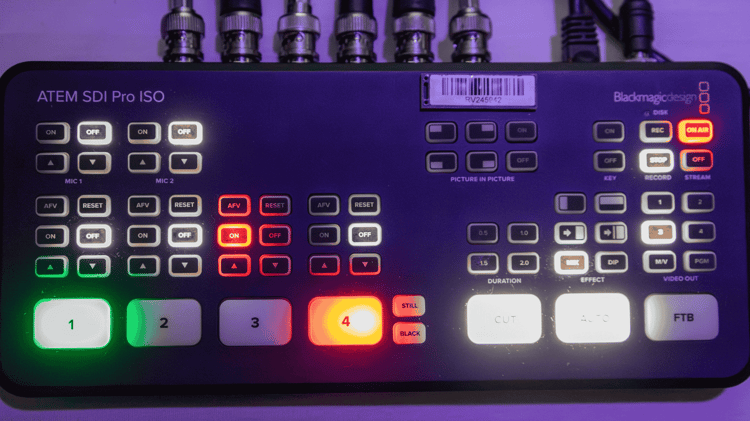 A video switcher allows operators to move between camera angles, presentation slides, and graphics.
In modern event live streaming production, switchers often handle several tasks at once. They handle anything from camera switching or video playback to streaming output and graphics overlay.
Popular switchers include OBS, vMix, and dedicated broadcast switchers. The goal is smooth transitions between visuals. When switching is done well, viewers barely notice it.
6. Add Graphics and On-Screen Information
Graphics make live streams feel organized and professional, even the simplest elements improve the viewer experience.
Common livestream graphics include:
-
Speaker name titles
-
Session topics
-
Sponsor branding
-
Countdown timers
-
Event logos
Lower thirds help viewers quickly identify speakers and keep the broadcast looking polished. Good graphics don’t need to be complicated. Clean, readable visuals are usually more effective than flashy animations.
7. Secure a Strong Internet Connection
Internet connectivity is the backbone of event live streaming. If the connection drops, the stream drops.
Whenever possible, use a dedicated wired internet line from the venue. Hotel WiFi is often unreliable during busy events. Many production teams follow a simple rule: Always have a backup connection.
-
Common backup options include:
-
Secondary wired networks
-
Mobile hotspot failover
Redundant internet connections can save a stream if the primary line fails.
8. Run a Technical Rehearsal
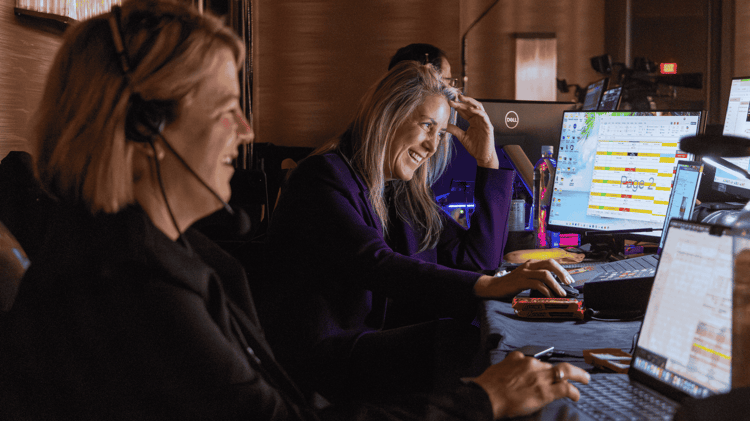 A tech rehearsal might seem unnecessary when schedules get tight, but it prevents major problems. Before the event begins, test the entire event live streaming workflow.
Best practices include checking the:
-
Camera framing
-
Microphone levels
-
Slide presentations
-
Graphics triggers
-
Video playback
-
Streaming encoder settings
Even a short rehearsal helps the team catch small issues before they become big ones. Live production is unpredictable so be sure to test to reduce the number of surprises.
9. Engage the Online Audience
One mistake many event teams make is forgetting the remote audience. Online viewers should feel like they’re physically at the event even if they are still in the comfort of their own home and in their sweats.
Being sure to utilize the live chat, audience polling, Q&A submissions, and social media integrations ensures that the online attendees feel engaged and included.
Some hybrid events even show audience questions on stage screens so speakers can respond to both in-person and remote attendees. The more interactive the stream feels, the longer viewers stay engaged.
10. Record and Repurpose the Content
Once the livestream ends, the content still has value.
Recording the stream creates opportunities for future content and many event organizers use event live streaming recordings to create:
-
Highlight reels
-
Speaker clips
-
Social media content
-
On-demand training videos
-
Marketing materials
Planning this ahead of time helps capture clean footage and usable segments during the event. A single livestream can produce weeks of useful content when handled correctly.
Use a Reputable AV Production Company Like Clarity to Set Up Your Event Live Streaming
Setting up event live streaming in a professional setting can get complicated fast…Save the stress of the unknown and hire the experts in AV to execute live streaming for your event. If you’re interested in including live streaming for your events, give us a call here at Clarity!